> For the complete documentation index, see [llms.txt](https://bullseye-bot.gitbook.io/bullseyebot/llms.txt). Markdown versions of documentation pages are available by appending `.md` to page URLs; this page is available as [Markdown](https://bullseye-bot.gitbook.io/bullseyebot/bullseye-telegram-trading-bot/bot-basics-how-to/buy-a-token.md).

# Buy a Token

How to Buy a Token using the Bullseye Trade bot

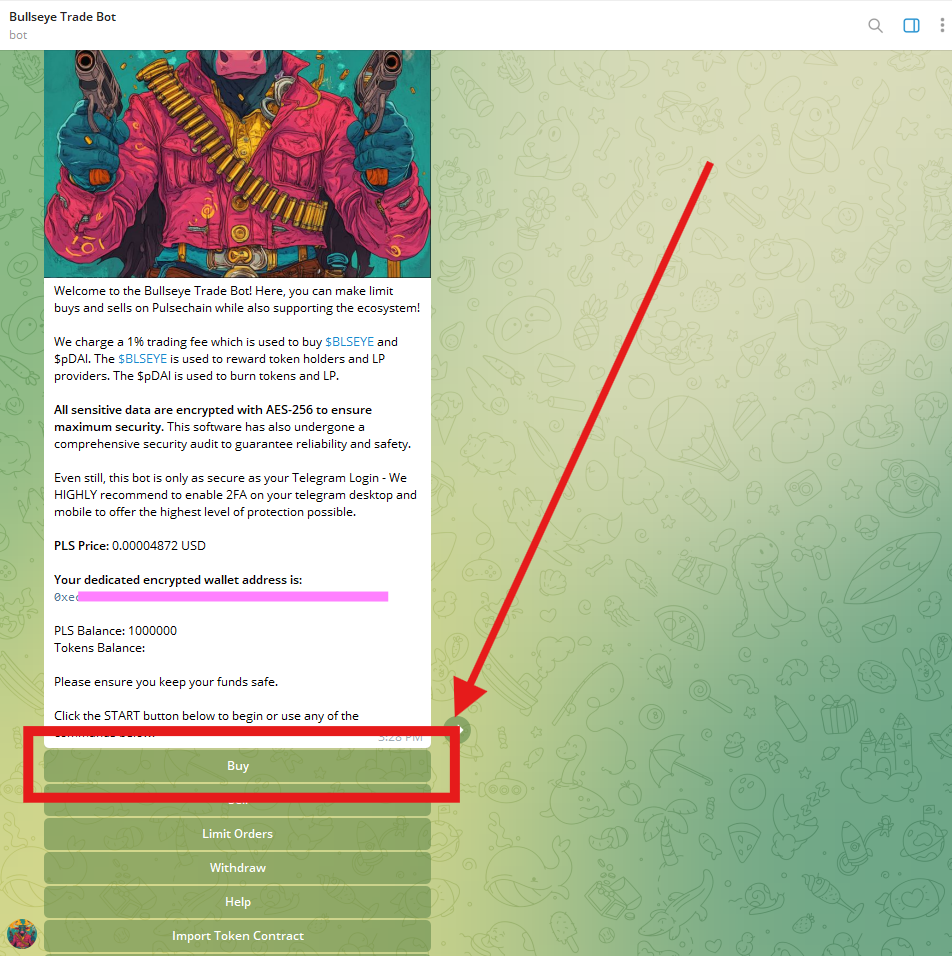
### <mark style="color:yellow;">1. Click The</mark> <mark style="color:yellow;"></mark>*<mark style="color:yellow;">Buy</mark>* <mark style="color:yellow;"></mark><mark style="color:yellow;">Button</mark>

<figure><img src="https://3449781553-files.gitbook.io/~/files/v0/b/gitbook-x-prod.appspot.com/o/spaces%2Fu3BzaWofvkalYXBlVveZ%2Fuploads%2FfFLjzItZvchFCXyRrqnx%2Fimage.png?alt=media&amp;token=c3f2dbb3-ea6d-4536-8ab5-11f9fbab7dd1" alt=""><figcaption><p>Click The Buy Button</p></figcaption></figure>

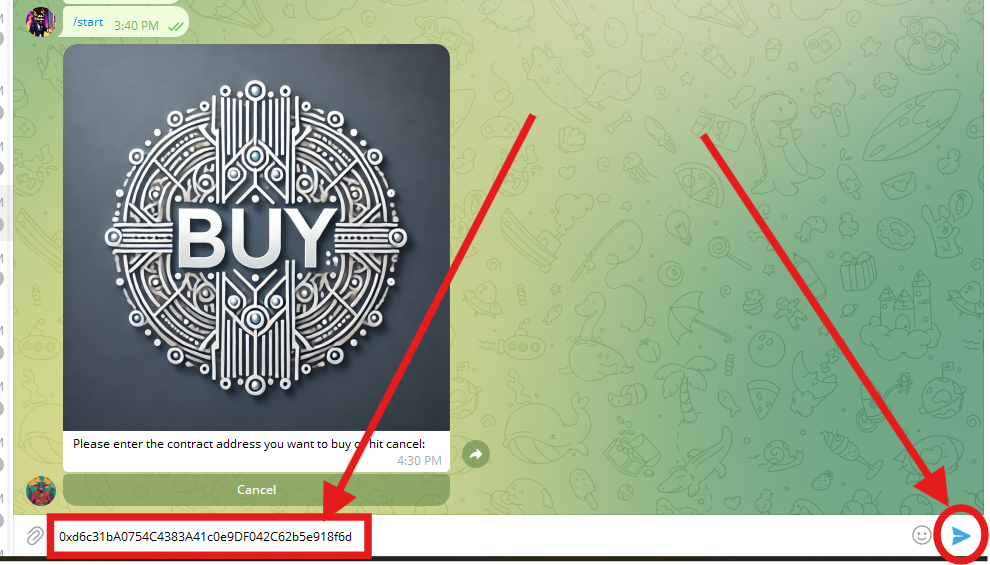
### <mark style="color:yellow;">2. Enter The Contract of The Token You Want to Buy</mark>

Type the address of the token you want to buy in the text field and press SEND

<figure><img src="https://3449781553-files.gitbook.io/~/files/v0/b/gitbook-x-prod.appspot.com/o/spaces%2Fu3BzaWofvkalYXBlVveZ%2Fuploads%2FQtp1hTaQQOqXqulYDhkQ%2Fimage.png?alt=media&amp;token=d0598c47-6e8f-4d07-aac2-c5b943ef0d32" alt=""><figcaption><p>Enter the contract address into the text field and press the SEND button</p></figcaption></figure>

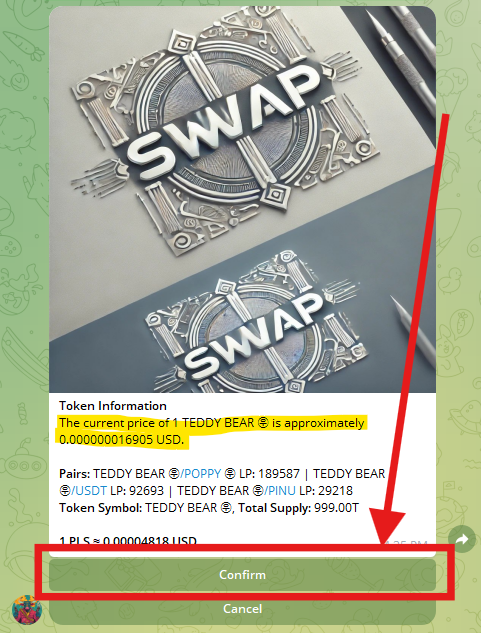
### <mark style="color:yellow;">3. Confirm The Token Information</mark>

If everything looks correct, hit the "Confirm" Button. If the token information is wrong, hit "Cancel" and start again

<div align="left"><figure><img src="https://3449781553-files.gitbook.io/~/files/v0/b/gitbook-x-prod.appspot.com/o/spaces%2Fu3BzaWofvkalYXBlVveZ%2Fuploads%2FMEac9HdtDgJFbNJes6Ae%2Fimage.png?alt=media&amp;token=74777de4-e1fb-4a1d-aecf-cc6668458581" alt=""><figcaption></figcaption></figure></div>

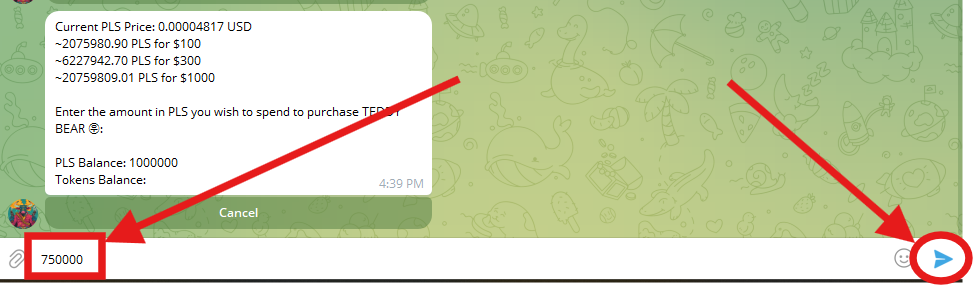
### <mark style="color:yellow;">4. Enter PLS Amount Desired for Trade</mark>

Key in the token amount in PLS you would like to trade and press SEND

<div align="left"><figure><img src="https://3449781553-files.gitbook.io/~/files/v0/b/gitbook-x-prod.appspot.com/o/spaces%2Fu3BzaWofvkalYXBlVveZ%2Fuploads%2FFHwOam46rzEacwaxEwR9%2Fimage.png?alt=media&amp;token=ac08a76e-6ac1-4e87-adbe-50f407251580" alt=""><figcaption></figcaption></figure></div>

### <mark style="color:yellow;">5. Enter Slippage %</mark>

Key in the slippage/tax amount desired and press SEND <mark style="color:red;">**(Must be a number between 1 and 49)**</mark>

*Note - 1 = 1%*&#x20;

<div align="left"><figure><img src="https://3449781553-files.gitbook.io/~/files/v0/b/gitbook-x-prod.appspot.com/o/spaces%2Fu3BzaWofvkalYXBlVveZ%2Fuploads%2F8ewAfKS0cwrYXZSmmWuT%2Fimage.png?alt=media&amp;token=a4d37e2d-ce3c-493e-a809-4e535da93ee7" alt=""><figcaption></figcaption></figure></div>

### <mark style="color:yellow;">6. Confirm the Slippage Amount</mark>

Key in "Yes" in your text box and hit SEND

<figure><img src="https://3449781553-files.gitbook.io/~/files/v0/b/gitbook-x-prod.appspot.com/o/spaces%2Fu3BzaWofvkalYXBlVveZ%2Fuploads%2FFAYlDod46Pg4PQdts3wh%2Fimage.png?alt=media&amp;token=df617920-ea8e-4729-b6d5-1ab4d1007725" alt=""><figcaption></figcaption></figure>

### <mark style="color:yellow;">7. Verify the Trade</mark>

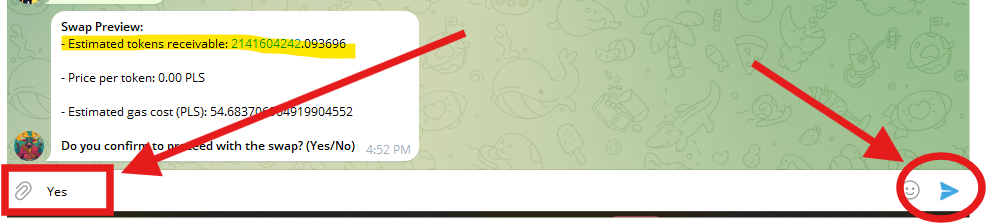
If everything looks correct, type "Yes" and hit SEND one more time to finalize the transaction

<figure><img src="https://3449781553-files.gitbook.io/~/files/v0/b/gitbook-x-prod.appspot.com/o/spaces%2Fu3BzaWofvkalYXBlVveZ%2Fuploads%2FA5V19at4ACDwIQHDK8XG%2Fimage.png?alt=media&amp;token=60951f82-2366-46a6-b51c-c285db2f609d" alt=""><figcaption><p>Verify the Token Allocation</p></figcaption></figure>

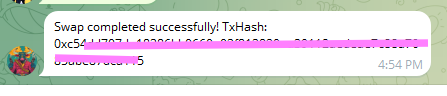
### <mark style="color:yellow;">8. Congratulations - Your Trade is Complete!</mark>

You can verify the transaction buy keying in your hash on [www.scan.pulsechain.com](https://bullseye-bot.gitbook.io/bullseyebot/bullseye-telegram-trading-bot/bot-basics-how-to/www.scan.pulsechain.com)

<div align="left"><figure><img src="https://3449781553-files.gitbook.io/~/files/v0/b/gitbook-x-prod.appspot.com/o/spaces%2Fu3BzaWofvkalYXBlVveZ%2Fuploads%2FQsMP3Y5KFOZEJwVkIsaY%2Fimage.png?alt=media&amp;token=c81739a5-951d-4abf-8633-ba92399da9a0" alt=""><figcaption><p>TRADE COMPLETE!</p></figcaption></figure></div>

### <mark style="color:yellow;">9. Add Token to View Balance</mark>

See [next page](/bullseyebot/bullseye-telegram-trading-bot/bot-basics-how-to/buy-a-token/how-to-view-token-balances.md) to learn how to view your balances